See what matters. Focus on it.
Color the rest.
Calendar Clarity dims distracting events so the day you care about stands out, runs a focus timer with ambient sound right on Google Calendar, and still keeps unlimited custom colors — so your whole day reads at a glance.
Works with your existing Google Calendar · Free · No sign-up
Google shows everything at once. Calendar Clarity dims the noise.
Your week isn't really this busy — it just looks that way. Same events, same colors, one calmer picture.
Solo, external, declined, and tentative events fade into a quiet backdrop — never below 30%, so nothing disappears — while the meetings that need you stay crisp and lift to the front.
A calmer way to use Google Calendar
Four ways Calendar Clarity helps you see, focus, and organize — colors and all.
Clarity in about thirty seconds
No setup and no account — three flips and your week gets quieter.
Add it to Chrome
Install free from the Chrome Web Store and open Google Calendar. No sign-up, no onboarding, no account — Calendar Clarity works the moment the page loads.
Choose what fades
Flip on the event types you'd rather mute — solo, external, declined, tentative. Faded events dim just enough to recede, never below 30%, so your week gets quieter, not emptier.
Focus on what's left
Start a focus timer on any event with ambient sound and Zen mode, tick off solo blocks like tasks, and color the rest into named categories — all inside the calendar you already use.
See what matters — the noise fades back.
Google Calendar shows everything at the same volume. Calendar Clarity turns the noise down: solo (guest-less), external, declined, and tentative events fade back so the meetings and blocks that actually matter stay bright.
- Dim solo, external, declined, and tentative events
- Nothing disappears — faded events never drop below 30% opacity
- Turn solo events into tickable tasks you check off on the calendar
Protect your focus, right on your calendar.
Start a focus timer on any event without leaving Google Calendar. Bundled ambient sounds — rain, ocean, café, and soft synth — plus a distraction-hiding Zen mode that quiets everything but the moment you're in.
- Start a session from any event — no separate app
- Ambient sounds: rain, ocean, café + soft synth
- Zen mode dims the calendar while you work
- Session history and streaks to keep momentum
Reshape your schedule in a click.
Duplicate, split, spread, postpone, reschedule, or extend any event with smart defaults — tweak only if you like. Fully opt-in: it asks for calendar access only when you turn it on.
- Six one-click actions with smart defaults
- Postpone, Reschedule, Extend, Duplicate, Split, Spread
- Opt-in — off until you flip it on
…and colors that sync to your phone.
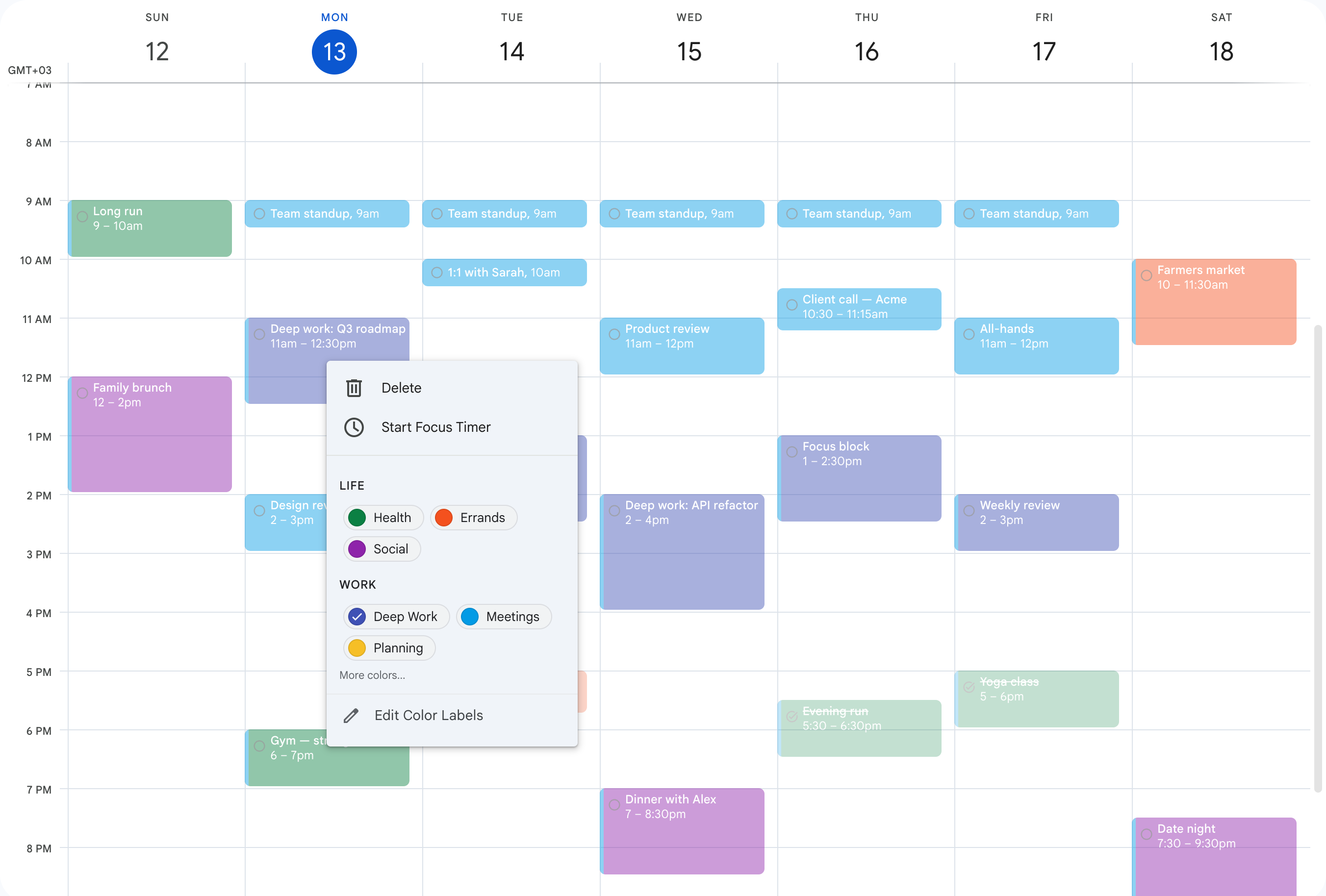
The hook you came for: create a color in Google Calendar's own Labels dialog, then name it and sort it into groups — Work, Health, Deep Work, whatever fits — so the right one is a click away in the right-click menu. Every color is a real Google label, so it shows in the Google Calendar app on your phone and every device, not just this browser.
- Group and order your colors in the popup, or open the same editor as a full page
- Works across every calendar you use — see which calendar each color belongs to, one calendar at a time
- Clean color blocks: the calendar-color strip Google draws on colored events is hidden by default
- Native Google colors — they sync to the Google Calendar mobile app and every device
See it in action
A quick tour of dimming the noise, focusing, and organizing your calendar.
Questions, answered
Is Calendar Clarity really free?+
Yes — every feature is free, with no trial, no paywall, and no premium tier. Event visibility, the focus timer with ambient sounds, event actions, and unlimited custom color categories are all included at no cost.
Do I need to create an account?+
No. There's no sign-up and no login. Install the extension, open Google Calendar, and it works immediately. Your settings live in your own browser.
What data do you collect, and where does it go?+
Calendar Clarity runs entirely in your browser — there's no account and nothing to sign into, and the extension sends nothing about your calendar to us. The only outside service it talks to is Google: if you turn on Event Actions, those requests go straight from your browser to the Google Calendar API. Everything stays between you and Google.
Does it change or delete my calendar events?+
Visibility is purely visual and never touches your events. Colors set Google's own event color (that's what lets them sync to your phone) — a color assignment only, never the title, time, guests, or description. Event Actions like duplicate, split, or reschedule do edit events, but only when you turn them on and only when you run them, always with a clear preview first.
Will dimmed events ever disappear completely?+
Never. Faded events are capped so they never drop below 30% opacity. They step back so the important things stand out, but they stay fully visible and clickable — you won't miss anything.
Does it work with Google's built-in event colors?+
Yes — it's built on them. You create colors in Google Calendar's own Labels dialog; Calendar Clarity names them, sorts them into groups across every calendar you use, and hides the calendar-color strip Google draws on colored events (one switch brings it back). Colors are the familiar hook; the real value is visibility and focus — dimming the noise and helping you concentrate on what is left.
Do the colors show up on my phone?+
Yes. Calendar Clarity uses real Google Calendar colors (native event labels) — so anything you color shows in the Google Calendar app on your phone and every device, not just this browser.
Does it color my events automatically?+
No. You choose each event's color yourself from the right-click menu, where your named groups sit one click away. Earlier previews tested automatic coloring, but it isn't part of the extension today.
What exactly is 'event visibility'?+
It's the ability to dim the events that distract you — solo blocks, external invites, meetings you've declined, and tentative holds — so the events that need your attention stay bright. You choose which types fade, and you can turn solo events into tickable tasks.
What comes with the focus timer?+
Start a timer on any event, play a bundled ambient sound (rain, ocean, café, or soft synth), and switch on Zen mode to hide distractions. Calendar Clarity keeps your session history and streaks so you can see your focus add up over time.
Do I have to give calendar access?+
Only if you want Event Actions. Dimming, the focus timer, and colors need no special permissions. Actions like duplicate and reschedule ask for calendar access at the moment you enable them — never before, and never silently.
Which browsers does it support?+
Calendar Clarity is a Chrome extension and works in Google Chrome and other Chromium-based browsers such as Microsoft Edge, Brave, and Arc, on desktop, with Google Calendar in the browser.
What are event actions?+
Opt-in shortcuts for reshaping your schedule: duplicate an event, split it into chunks, spread a series across days, postpone, reschedule, or extend — each with smart defaults so a few clicks do what used to take manual dragging.
Will it slow down Google Calendar?+
No. Calendar Clarity is lightweight and runs locally in the page, applying visibility and colors as the calendar renders. There is no network round-trip and no noticeable lag.
Private by design
Free, forever. No account, no sign-in, no tracking. Calendar Clarity runs entirely in your browser — your calendar stays exactly as you left it.
No account, no login
Nothing to sign up for. Install and it just works.
Your data stays with you
Your settings stay in your browser, and nothing from your calendar is sent to us. Event Actions talk to Google directly from your browser.
Opt-in calendar access
Only Event Actions ask for Google Calendar access, and only the moment you enable them. Colors, dimming and focus need no sign-in.
Ready for a calmer calendar?
Dim the noise, protect your focus, and keep your colors. Free to install — no account required.
Works with your existing Google Calendar · No sign-up